How do I register my Pre-order Bonus Code for FFXIV: Evercold?
To redeem your Pre-order Bonus Items and join Early Access for FFXIV: Evercold, please click the button for your platform and follow the instructions. Please note that the Pre-order Bonus Code is valid until December 31, 2027 after which it will no longer be possible to redeem.
For users who purchased directly via the Mog Station
Code registration is not necessary. Early Access and the Pre-order Bonus Items will have been automatically added to the account you pre-ordered the game on.
For users who purchased from another retailer, such as the Square Enix Store
Once you have your 20-digit Pre-order Bonus Code (Early Access Code), log in to the Mog Station using the Square Enix Account you want to use for the Early Access.
If you have multiple service accounts, please select the service account you want to use for Early Access.
Please confirm the appropriate service account by verifying that the service account has the character names and Worlds that you want to send the bonus items to. Please be careful as your bonuses will not be received on your desired service account if you select the wrong service account.
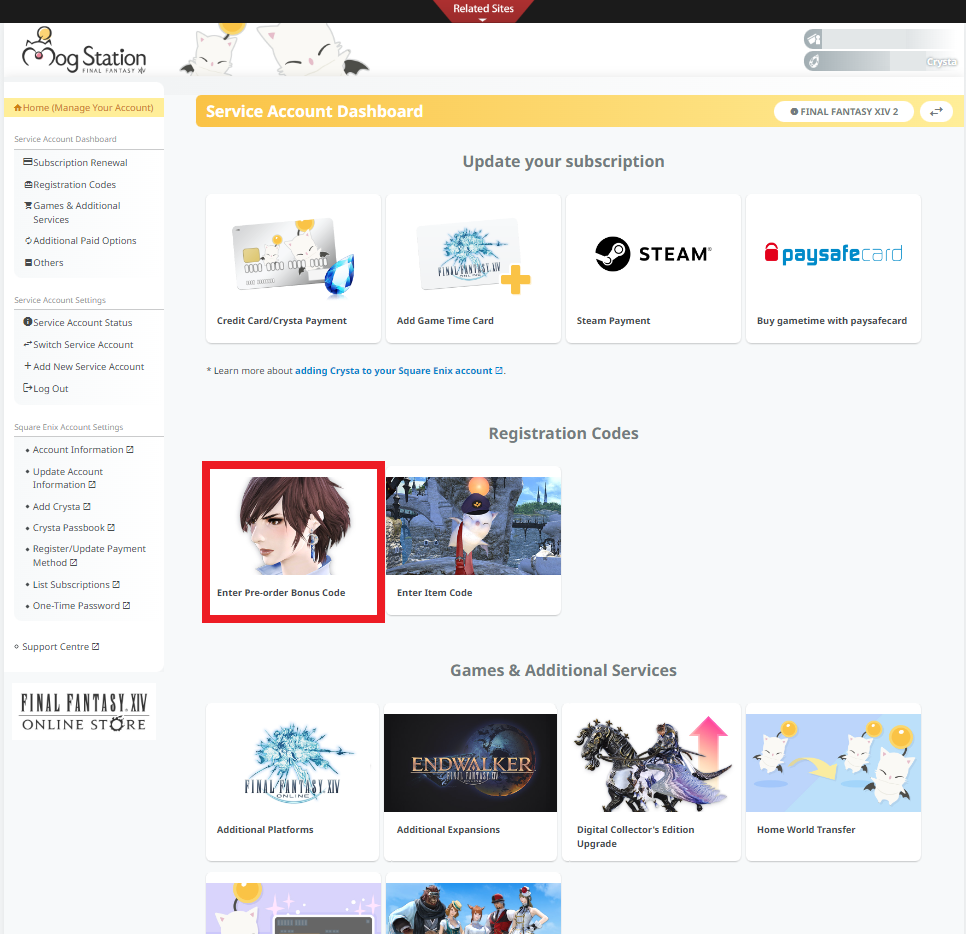
After confirming your service account, select "Enter Pre-order Bonus Code".
Enter your Pre-order Bonus Code, then click “Next”.
Confirm details, then click “Next”.
How to Confirm Pre-order Bonuses
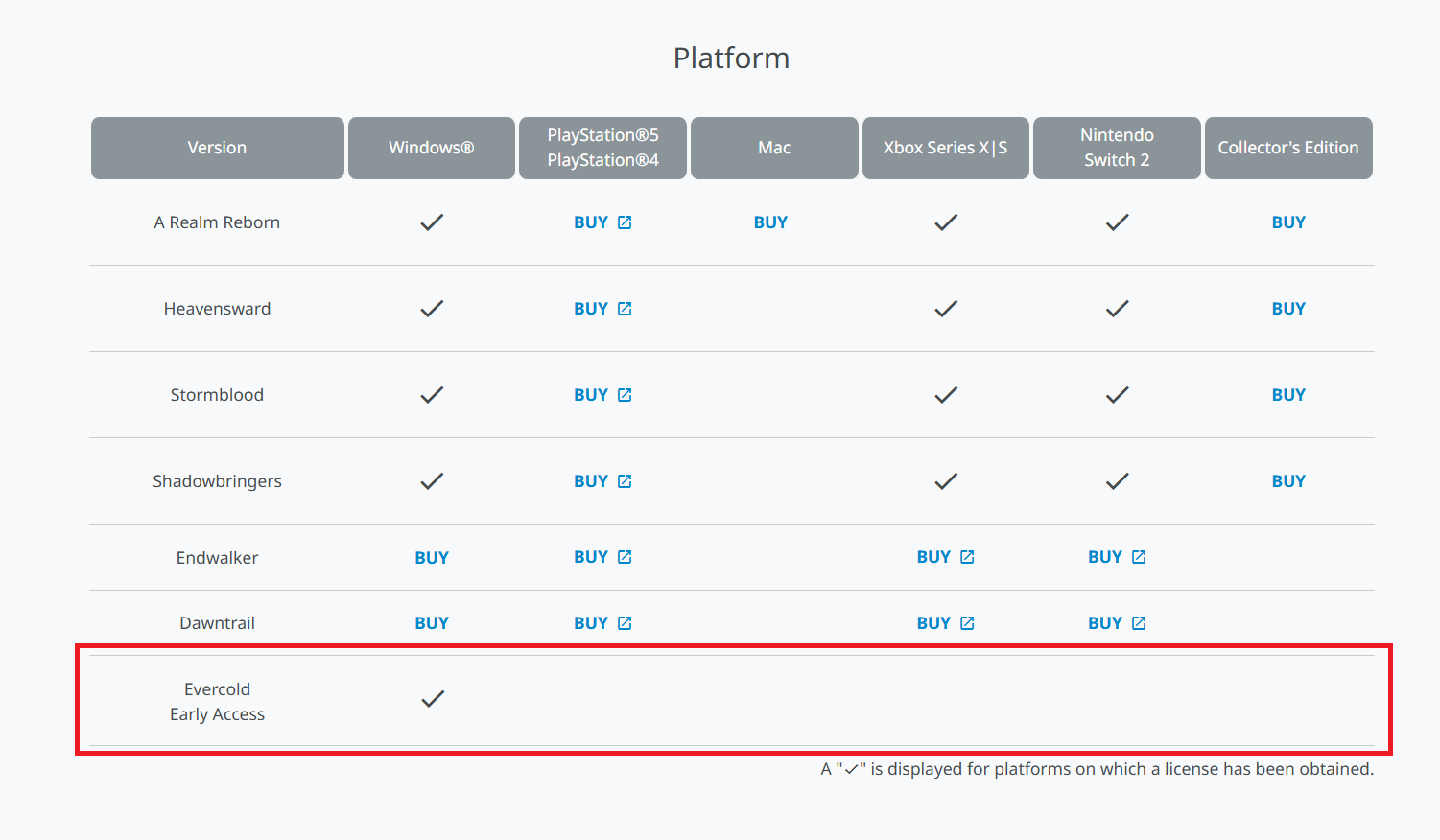
To confirm Early Access and Pre-order Bonuses, please visit the Mog Station, log in, and select “Service Account Status” from the top left menu. Scroll down to the table of platforms and licences owned and you’ll see a check (“✓”) mark next to Evercold Early Access.
Code registration is not necessary. Early Access and the Pre-order Bonus Items will have been automatically added to your account for PlayStation™Network at the time you pre-ordered the game. Please follow the steps below to register the entitlements to your Square Enix account.
Open FINAL FANTASY XIV and follow the instructions on the screen.
You will see "FINAL FANTASY XIV: Evercold - Pre-Order PlayStation®4" or "FINAL FANTASY XIV: Evercold - Pre-Order PlayStation®5” depending on the platform chosen. Select "Next".
You will see all available service accounts onto which you can register the pre-order licence. If you have multiple service accounts, please ensure you're selecting the appropriate service account by verifying that the service account has your characters on it. Please be careful as your bonuses will not be received on your desired service account if you select the wrong service account. Select "Next" to complete the registration process.
How to Confirm Pre-order Bonuses
To confirm Early Access and Pre-order Bonuses, please visit the Mog Station, log in, and select “Service Account Status” from the top left menu. Scroll down to the table of platforms and licences owned and you’ll see a check (“✓”) mark next to Evercold Early Access.
If you have pre-ordered FFXIV: Evercold on Steam, you can find your 20-digit Pre-order code by navigating to your game library and right-clicking on “FINAL FANTASY XIV Online”. Select “Manage" then "CD keys” to show all codes owned on that Steam account. The 20-digit Early Access Code will be listed there, starting with “RF7A”.
Log in to the Mog Station using the Square Enix Account you want to use for the Early Access.
If you have multiple service accounts, please select the service account you want to use for Early Access.
Please confirm the appropriate service account by verifying that the service account has the character names and Worlds that you want to send the bonus items to. Please be careful as your bonuses will not be received on your desired service account if you select the wrong service account.
After confirming your service account, select "Enter Pre-order Bonus Code".
Enter your Pre-order Bonus Code, then click “Next”.
Confirm details, then click “Next”.
How to Confirm Pre-order Bonuses
To confirm Early Access and Pre-order Bonuses, please visit the Mog Station, log in, and select “Service Account Status” from the top left menu. Scroll down to the table of platforms and licences owned and you’ll see a check (“✓”) mark next to Evercold Early Access.
Code registration is not necessary. Early Access and the Pre-Order Bonus Items will have been automatically added to your XBOX account at the time you pre-ordered the game. Please follow the steps below to register the entitlements to your Square Enix account.
Open FINAL FANTASY XIV and follow the instructions on the screen.
You will see "FINAL FANTASY XIV: Evercold - Pre-Order XBOX Series X|S". Select "Next".
You will see the service account onto which you can register the Pre-order licence. Select "Next" to complete the registration process. If you have multiple service accounts, you will see all of the service accounts that you can register the licence to. Please confirm the appropriate service account by verifying that the service account has the character names and Worlds that you want to send the bonus items to. Please be careful as your bonuses will not be received on your desired service account if you select the wrong service account.
How to Confirm Pre-order Bonuses
To confirm Early Access and Pre-order Bonuses, please visit the Mog Station, log in, and select “Service Account Status” from the top left menu. Scroll down to the table of platforms and licences owned and you’ll see a check (“✓”) mark next to Evercold Early Access.
Code registration is not necessary. Early Access and the Pre-Order Bonus Items will have been automatically added to your Nintendo Switch 2 user account at the time you pre-ordered the game. Please follow the steps below to register the entitlements to your Square Enix account.
Open FINAL FANTASY XIV and follow the instructions on the screen.
You will see the service account onto which you can register the Pre-order licence. Select "Next" to complete the registration process. If you have multiple service accounts, you will see all of the service accounts that you can register the licence to. Please confirm the appropriate service account by verifying that the service account has the character names and Worlds that you want to send the bonus items to. Please be careful as your bonuses will not be received on your desired service account if you select the wrong service account.
How to Confirm Pre-order Bonuses
To confirm Early Access and Pre-order Bonuses, please visit the Mog Station, log in, and select “Service Account Status” from the top left menu. Scroll down to the table of platforms and licences owned and you’ll see a check (“✓”) mark next to Evercold Early Access.
Please note that the Pre-order Bonus Items will be delivered in-game to users sequentially via the Moogle Delivery Service. The timing of this will begin when your Pre-order Bonus Code is redeemed (Windows®/Mac/Steam), or when your Pre-order is completed (PlayStation®4/PlayStation®5/XBOX Series X|S/Nintendo Switch 2). Early Access will begin 4 days ahead of the official launch, and Evercold will be downloaded automatically once Early Access starts.